Dear all Experts,
Due to we got some issue from File Share Service Client (FSS)6.5 after we upgraded FSS5.3 to FSS6.5.
When users use FSS client 6.5 that some documents can opened in webtop but it cannot open on FSS client 6.5.
For the example please kindly see as below.
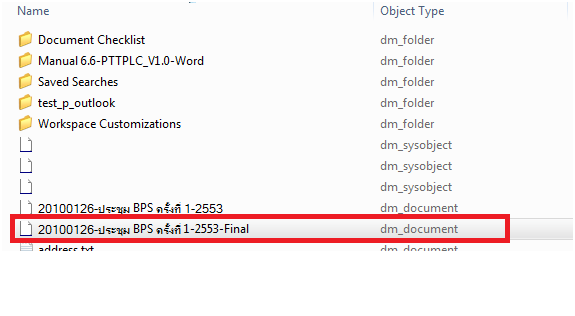
1.We need to open the document file name is “20100126-ประชุม BPS ครั้งที่ 1-2553-Final” in FSS client 6.5 as the picture below.
Note: this document we can open as normal in Webtop
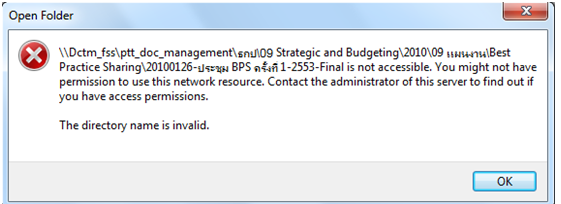
2. After we click View the document ,the error occurred as the picture below.
2. After we click View the document ,the error occurred as the picture below.
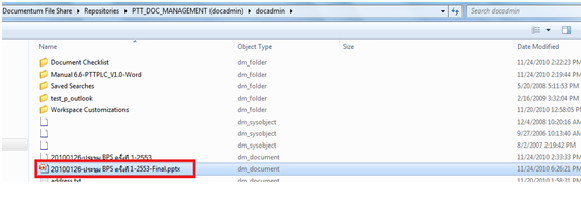
3.After we rename format of the document so we can open it as the picture below.
We rename document (enter format for document)
Example : We renamed from “20100126-ประชุม BPS ครั้งที่ 1-2553-Final” to “20100126-ประชุม BPS ครั้งที่ 1-2553-Final.pptx” so it’s seem FSS6.5 doesn’t know format of document after we inserted format of document ,it can open as normal
If you know how to fix this issue,please kindly reply or post it.
If you need additional information,please kindly contact me via e-mail : r_linlex@hotmail.com
I hope to see your reply as soon.
Thank you in advance. ^_^
Newdocmentum
