Best Of
Streamlined Access to In‑Demand Developer Services

Accelerate Innovation with the OpenText™ Cloud Platform
The OpenText™ Cloud Platform (OCP) is a next‑generation Information Management‑as‑a‑Service platform that powers the OpenText™ Core family of multi‑tenant SaaS applications and Thrust Services. Built on a highly secure and highly available architecture, OCP delivers the information management capabilities modern organizations need—scalable, resilient, and ready for rapid integration.
Whether you’re a startup building your first SaaS product, an ISV extending your platform, or an OEM embedding intelligence directly into your solutions, OpenText provides streamlined API access designed to help you move faster without compromising on enterprise‑grade reliability, security, or governance.
Now Available by Credit Card: Key OpenText Thrust Services
Organizations can now purchase select OpenText services directly by credit card—making it easier than ever for developers to start building with powerful information management capabilities.
Thrust Services Bundle
RESTful APIs for storage, metadata, capture/OCR, AI‑driven classification, workflow automation, and granular access control—ready to embed directly into your application stack.
Signature Thrust Services
Secure e‑signature APIs with audit trails, signer verification, and compliant document handling for regulated or high‑assurance workflows.
Information Intelligence Thrust Services
AI‑powered content intelligence that analyzes, classifies, and extracts metadata while detecting risk to support governance, compliance, and automation initiatives.
Faster Access. Faster Innovation.
Skip slow procurement cycles and complex onboarding. With OpenText’s credit‑card purchasing and developer‑ready APIs, teams can get up and running quickly—testing, building, and shipping smarter applications without friction.
Start Building Today
Explore available plans, test services for free, and begin integrating OpenText APIs into your applications:

Re: OpenText Content Server IDE (CSIDE) 25.x Complete Documentation
Just to add some further color to these great responses:
When you create WebReports, you are actually creating OScript. When a WebReport is submitted, the code on the backend converts the WebReports template (reportview ) into an optimized OScript file that is cached, and compiled, so when you run a WebReport you are running native, compiled Oscript code. Of course the more complex each reportview is, and the more "Tags" you use, the more Oscript code you are running, but behind the scenes you have chunks of OScript that are completely supported by OT to remain compatible with each Content Server release. That is why historically, WebReports were seen as a good alternative to native Oscript. Of course there are still ways to write bad (non-robust) WebReports if you don't actually use the tools provided. The tag library is essentially an API to use Oscript functions in a supported way.
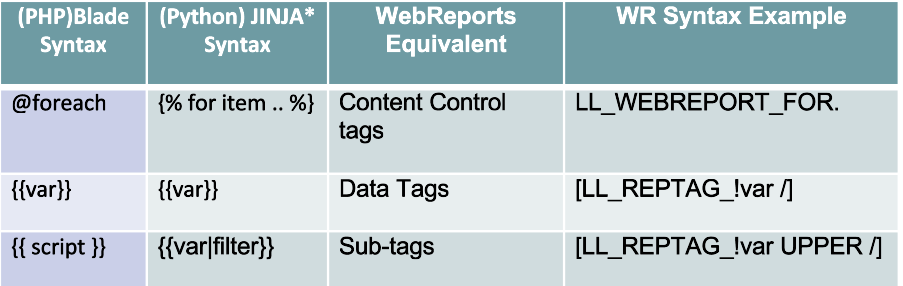
The basic WebReports paradigm is completely analogous to many modern day "template" based technologies that allow content and tags (usually handlebar/moustache type syntax in newer languages). There are essentially three main components in every one of these technologies and the table below shows how they compare. The WebReports tag syntax is unusual, but you only need to learn these three tag types. After that it's all about the specific API endpoints provided by these tags and there is an excellent tag guide provided to learn these items. I should also note that WebReports also support OScript blocks of code that allow basic Oscript script to be added to any WebReport. Several limitations are implemented with this feature to maintain the strict API, but it does provide a simple scripting ability to supplement the template approach, as is the case with other technologies listed below. Why the funny tag syntax? Well WebReports tags were designed to match the WebForm tags that existed back in 2002-3 when WebReports was first created. This technology pre-dated more modern types or syntax with Django possibly leading the way in about 2005.
Finally, with all of the approaches listed, the success is often about design and architecture, how the application is broken down into functional components, how you query data (SQL queries are the most common reason for performance issues ), filtering and sorting can be down at the DB level, or the server level, or in the client. WebReports has historically provided a platform that allows fairly swift implementation of applications, but as with all technologies, maximum performance, security, portability, and usability require a more rigorous development process, or (as is often the way) an interactive improvement process. We see many existing WebReport customers in this phase of review and improvement and thus that is where we have focused our products and services today.
Greg Petti

Re: OpenText Content Server IDE (CSIDE) 25.x Complete Documentation
The AddressBook example mentioned by @appuq is available in older versions of the CS IDE docs, but as mentioned the OT training course is a good place for the basics, but there is still a big gap between that and actual live solutions, forums like this can help along with experienced resources.
SmartUI/JATO is one interface option, but may not deliver what you need for your solution(s), e.g. Classic UI support etc. It also have a vastly different skill profile for development resources.
AnswerModules is a more developer focussed overlay that WebReports allowing deeper integration with OTCS, but again a good grounding in OScript development will help you understand why the scripts in Groovy need to be as they are etc.

Re: OpenText Content Server IDE (CSIDE) 25.x Complete Documentation
Hi, it looks like my previous comment didn't make it in. Just to build on what Appu and Greg have mentioned, both extremely experienced in this area, Content Server has very many options for personalizing and customizing. In the Classis UI, there are appearances, ActiveView, WebReports and others that provide a layer of development without oScript and using common web standards like HTML, JS, CSS, etc. In the Smart View, there are widgets that allow for custom and dynamic content and custom perspectives, as well as CSS file configuration for changing the overall style. I always suggest customers look at all the options and compare to their needs and their skills in house.
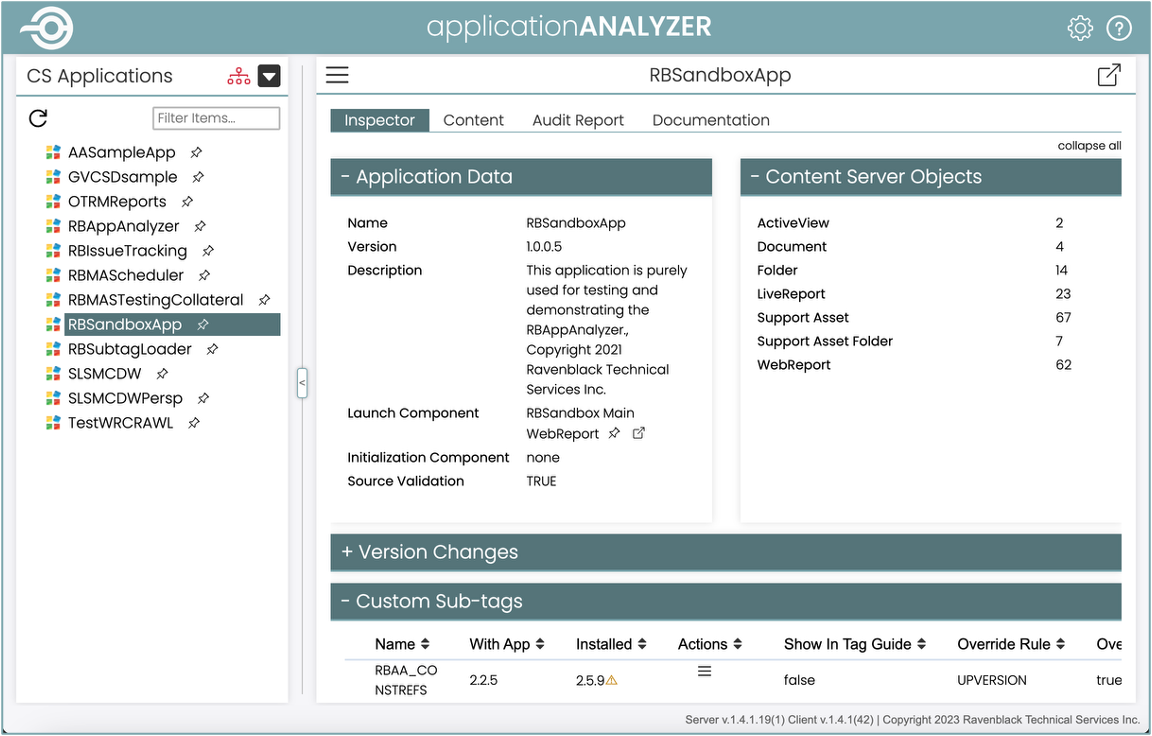
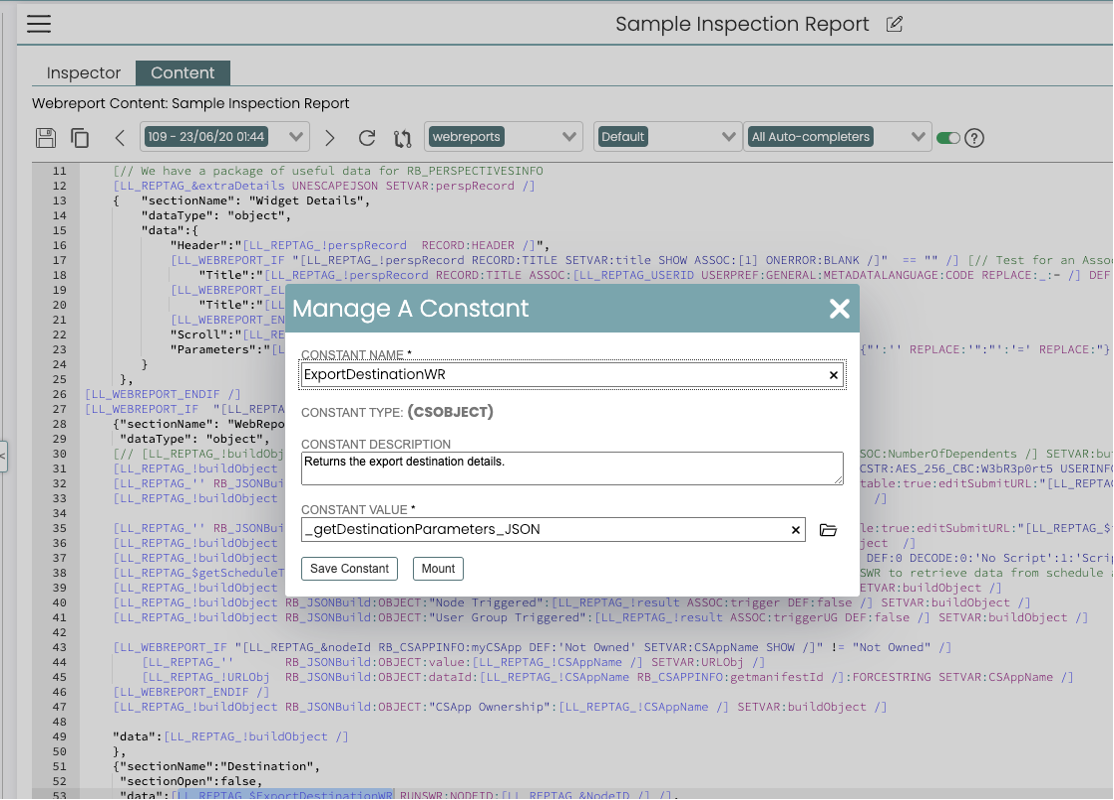
One thing I will add about WebReports is that it used to be a separate purchased module, but it has since been rolled into core Content Server and is available at no extra cost, and there is a lot of solid documentation to get started, so its worth looking at as there is no cost associated with trying it. We are still using it to build full applications for Content Server, including a modern development environment with AI tools, such as in the attached screenshots.

Re: OpenText Content Server IDE (CSIDE) 25.x Complete Documentation
Why not consider training? The documentation available, along with the creation of a sample module, kind of covers the most commonly used aspects of code. Also, Oscript is not a widely used software; it gets used only in OTCS, so unless a company/organization has committed towards creating a technical debt vis-à-vis you will find this difficulty. Currently, Oscript is widely used by partners who create products and modules, and it so happens that a lot of them are experienced or ex-opentexters.
Most OT installs will not even allow custom modules to be installed, especially in cloud and others, unless you are a name-brand recognized vendor/partner, so most customers get by doing lighter integrations (SOAP/REST/WR/AM).
AM (answermodules) is probably the easiest way to add functionality to OTCS in a relatively cost-effective way, as you can find a lot more Java/Groovy programmers.WR is also used as an alternate way.
For self-study, I had found that doing the addressbook module, this module is akin to a "Hello World" of Oscript .OT used to maintain it for some time. I think I was the last one who made something that works in CSIDE. This teaches the developer subtypes, request handlers,webnodes, and commands; however is geared towards Classic UI, which is weblingo.WF and Event Scripting were easy wins, but nowadays WR offers you that much more easily.
For SmartUI, you have to invest in an SDK and work through the example, although SmartUI is a way of doing powerful rest based javascript, and that is how the world is going. Perhaps with AI, SmartUI might now be easier.
Hope some of it made sense :)
 appuq
appuq
Re: AI in Output Management
OpenText Experience Aviator is the first port of call to make - available in the cloud based OT Communications product.
Anything else will have to be a third-party add-on. You can make it available to Exstream with business process automation software. There are many solutions out there which are cheap and very easy to implement, especially if you already have a Kubernetes system running some images for you.
Image and text generation is probably not a main priority when it comes to AI use in a CCM product as an organisation's communications tend to be somewhat structured, repeatable, compliant and legally binding etc, etc.
What I would like to see instead is AI battling template lifecycle management, dynamic communication routing, customer journey management and live error handling. There are signs that this is exactly what will be available in the near-future.
What would you like to see yourself in the product?
 Vyv
Vyv
Re: Exstream version history
As I understood from the presentation at the DX event in Paris this January, OpenText is now moving to bi-annual releases for OT Communications.
There will be an XX.2 release (with support for 2 years) that has some hot fixes and new features and then an XX.4 release (with support for 5 years). The XX.4 will be the main release recommended for all customers.
The explanation from OpenText was that customers had complained that they had a hard time keeping up with four releases per year.
So, I don't think you will see a 26.1 version of Communications.

Re: Exstream StoryTeller an total number of pages
That is the way to go, Jean Marc. At least if you simply want the Page of Pages to appear on your pages. But since the question was how to use the information to steer content, that would be tricky. :-)

Re: Switch from server based to cloud based OpenText Exstream
Hi there, the differences between Exstream (StreamServe) and OpenText Communications (Exstream Cloud Native) are in the engines used. You will need to migrate - is the short answer.
You should get in touch with OpenText for more information before taking any decisions.
Of the systems that I am familiar with where customers have moved their business applications to the cloud, they have left their CCM solutions behind on-premise for many reasons. (Project scope, phased cloudification tactics, required access/data from network, access to local network printers and other needs). Yet many of these issues can be solved with process flow automation software quite elegantly.
To your questions:
- Upgrade:
- StoryTeller processes can be migrated to OT Communications with an external migrator package. Scripting is converted to JavaScript by AI yet may also loose context (and so may require reimplementation).
- SAP Connectivity will have to change as well to API / HTTPS or Cloud Object Storage. You could also implement some event streaming here for fun.
- Archiving may require a simple change - I would imagine that remains quite similar.
- The same email server can be used if available from where you are running from - otherwise you could switch to an alternative provider (quite cheap).
- The fat clients are replaced by development editors within a web-browser (Communications Designer / Content Author). This is a very nice development.
- You will have to provide the SAP XML data in some way to your Cloud system - there are many alternatives here.
- Your point about the XML transformation is valid. You may wish to do prior to send or with an XSLT filter upon arrival into Orchestrator.
- This is the magical question…. it will most likely need to be re-implemented. OT Communications does not have repeaters, data templates or XPath. You have to go looping in loops a lot.
- I too have heard that MS Word files are better in the Exstream - but I have no proof.
This is just me answering here and I may be very wrong or outdated about some parts - so read this with a pinch of salt and let’s hope that someone else also answers.
Vyv
Re: Running Streamserve 5.6.2 on WIndows Server 2025
Hi, I managed to find a fix for this, it had been previously raised under .
The issue was that the user that was running the Streamserve applications wasn't an admin on the server. I added the user to the administrators group and I can now access the runtime properties and there are no more warnings in the log.
Thanks for your help.
