Hello Folks,
I'm trying to capture the current user (Userid) details in a table while they are providing any input in the form.
But on the DB level I'm not able to achieve that Kindly suggest something.
Regards,
Ritikraj Singh,
+91 7610541180
If there are Accepted Answers, those will be shown by default. You can switch to 'All Replies' by selecting the tab below.
If you are talking about Content Server(Livelink) Form templates if I am not mistaken its documentation starts with all the replacement variables one can use using that product. If you are new to that add a Form template and in the help for this page icon search for online documentation. Livelink userids are KUAF.IDS so if you need friendly names do your translations although I feel that is also given out in standard documentation
Or are you saying you know who submitted or revisioned the form as in you got "Ritikraj Singh" from Content Server but you do not know how to put it into a form table?
Thankyou Appu for providing this information.
But my requirement is, I'm using one workflow where I'm using one form and in that form parallelly few people are giving their response manually.
So But I want to capture the response that has been provided by the which user on Database Level.
I have gone through with few Forum discussions and KBs and I got to know that Using API We can achieve this.
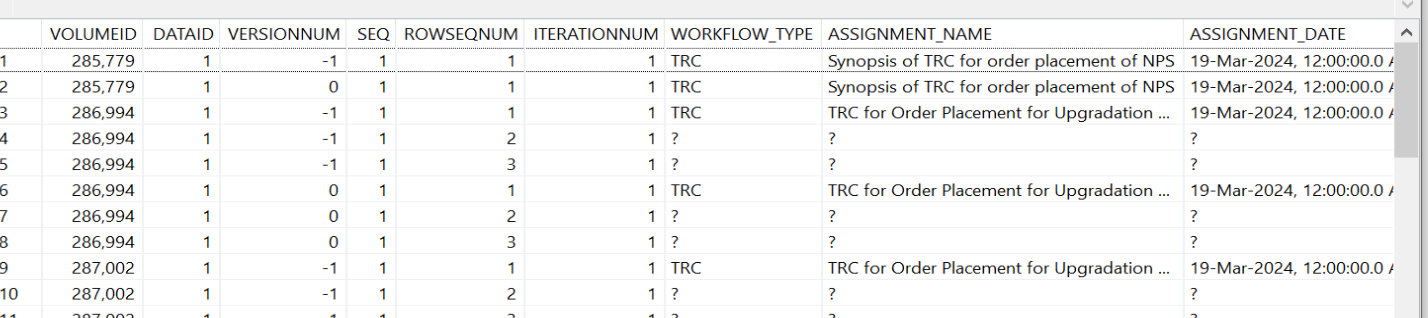
If the Form is inside the workflow the workflow dataid is the owner/user of the form so in those cases when the form shows up in the user browser one captures that information and inserts it as the person who did that so if you look at the form data inside the workflow you will see 6 rows of OT technical data and rest is for your form data stuff
OT has a document that says how they handle it but for simplicity, but from memory if you look at the data above the first column of VolumeID will be your workid and the second will be the Form DataID inside the WF.So open an instance of a running workflow look at the row substituting the workflow for the ownerid and check if the DataID is the forms dataid.I think SEQ will also be either null or the WFID.
It is important that you check(or for people like me who are trying to help) to understand what kind of form revision/submission happens or what you have chosen there.
What I used to do is if I needed to know who did what versioning of the form submit needs to happen otherwise there is a single row for the workflow instance. Usually what we then do is when the form is presented on a browser we have the context info provided,we will introduce another form template field say "usersubmit" or something of that sort, and when the user pushes it will be on that row just like all the other data
Hello Appu,
Thanks for the knowledge.
I have selected revision/submission as:
Revision: None.
Submission : SQL table.
For me it's showing Volume ID as a Workflow ID and not able to find weather it's owner/user.
Please let me how to do the configuration so that I can achieve that.
Ritikraj Singh
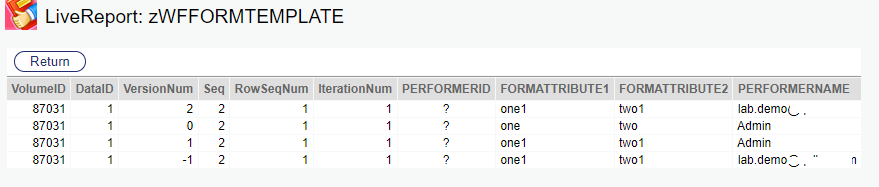
Go through Support or old forums in the workflow/form. I think there is a document detailing how Form Data is handled in the workflow. With that setting here's how many of us will attempt the problem. We will have an additional field in the form to capture it so amend your Form Template and call it PerformerID so in the revised SQL it will have another field called Performerid. Make it integer so that it is a valid user.
in my test, I made a small JS change based on this OT knowledge.I also only work with classic forms in CS workflow
When a Form loads OT gives you these by default
/otcs/cs.exe?func=help.index&pagename=%2Fimg%2Fhelp%2F_en_US%2Fform%2Fft-addview-bg.htm
All I am doing is putting the value OT supplies into a Form Field on load and then adding my view as a HTML view of the form…
I believe with this change you can trap the user onto a custom field in your table
so I think the way I read this is -1 is the data the form will show a user who sees it. Version num0 is the Initiate step data(I kicked off workflow and hit apply on the form), then it moved to a form step for Admin(version num=1), and then it went to lab. demo(version num=2)
I don't have more time to look at this but this may be a start…
You need to find that technical document detailing how Forms and forms in a WF handle data… I don't think the user who submitted the form is available in the table, it may be available as part of the WF Audit…
Someone who has done this in a configuration way may help you if you cannot understand this.
For you or anyone else, I found that from the old place
This was written by a great OT Contributor Bhupinder Singh .You can also see me at that time in the threads :)
This is the basis for your answer but you have to insert that info yourself…
https://knowledge.opentext.com/knowledge/llisapi.dll?func=ll&objId=60956474&objAction=viewincontainer&ShowReplyEntry=60962470#forum_topic_60962470