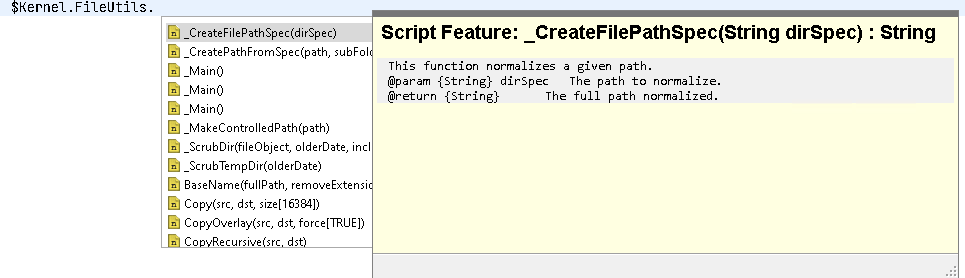
looking at the following :
I've tried a few ways from the Eclipse doc and AI chatbots to get my own comments to appear for my custom functions but keep just getting the function name, is this possible or is it a limitation of the CS IDE plugin ?
If there are Accepted Answers, those will be shown by default. You can switch to 'All Replies' by selecting the tab below.
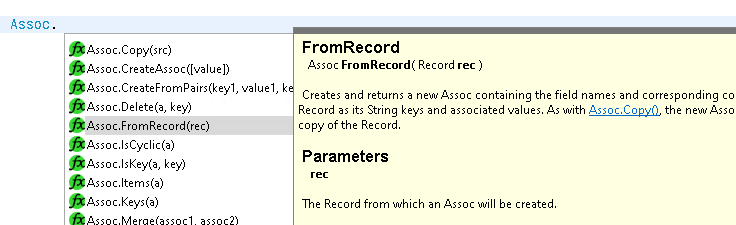
Hi Greg - type ahead stuff is changing quite a lot in the 26.4 release, including what I think you're asking for - IIRC your version of CSIDE only provides text info on builtins, but once 26.4 is out you should get function & object comments (where comments exist) as well:
… as you can see: the help blurb will be HTML instead of plaintext, and will have clickable links (where links in the online documentation exist):
… the same blurbs will be shown when you hover things in the IDE.
More importantly: the detection for this sort of things has improved a lot, both in accurate results & speed. The changes also apply to "Go to definition (F3)" and hopefully "Find Workspace References (shift-control-G)" (I'm currently working on the latter bit now, I'm hoping something usable is in for the 26.4 release, but no promises).
Hi @Dave Carpeneto - any word on whether the VSCode plugin will also be arriving in 26.4 per
Product Roadmaps